
HUBS
Unleashing the Power of HUB: Connectivity Redefined

- Product Introduction
In today's digital age, where multiple devices are an essential part of our lives, the need for seamless connectivity and efficient data transfer has never been greater. Enter the HUB, a remarkable device that serves as the central nerve center for all your connectivity requirements, revolutionizing the way you interact with your various gadgets.
The Importance of Connectivity in the Modern World
Our Device-Dependent Lifestyle
In recent years, we have witnessed an explosion in the number of electronic devices we use on a daily basis. From smartphones and tablets to laptops, gaming consoles, and peripherals like printers and scanners, each device plays a crucial role in different aspects of our lives. Whether it's for work, entertainment, or communication, these devices need to be connected and work in harmony to provide us with a seamless and efficient experience.
The Challenges of Multiple Devices
With the increasing number of devices, comes the challenge of managing their connections. Different devices often have different ports and connection standards, which can lead to a clutter of cables and a confusing setup. Trying to connect multiple devices to a single computer or other host device can be a nightmare, with limited ports and compatibility issues. This not only affects our productivity but also detracts from the overall user experience. It's in this context that the HUB emerges as a game-changing solution.
What is a HUB?
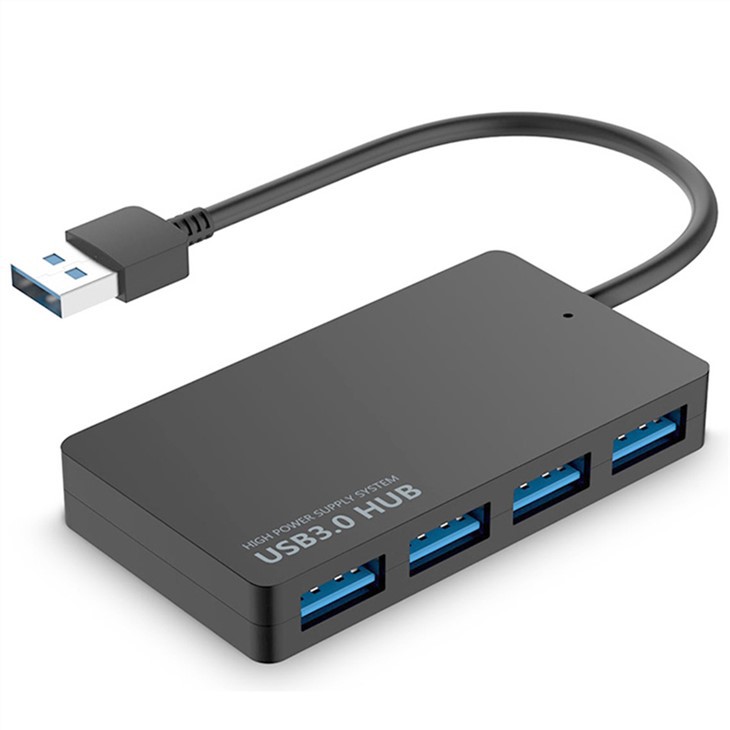
A HUB, short for a USB hub or a network hub depending on its functionality, is a device that allows multiple devices to be connected to a single host. It acts as a central connection point, expanding the number of available ports and enabling simultaneous communication between different devices and the host.
Key Features and Benefits of a HUB
Expanded Connectivity
Multiple Ports: One of the most significant advantages of a HUB is the provision of multiple ports. Whether it's USB ports for connecting peripherals like flash drives, keyboards, mice, and external hard drives, or Ethernet ports for network connectivity, a HUB gives you the ability to connect several devices simultaneously. This means you no longer have to constantly unplug and replug devices to make room for others.
Compatibility: HUBs are designed to be compatible with a wide range of devices and operating systems. Whether you're using a Windows PC, a Mac, or a Linux-based system, most HUBs will work seamlessly, ensuring that you can connect all your favorite devices without any compatibility issues.
Convenience and Organization
Cable Management: With a HUB, you can say goodbye to the tangled mess of cables. Instead of having multiple cables protruding from your computer or other host device, you can connect all your peripherals to the HUB and then have a single cable connecting the HUB to the host. This not only makes your workspace or setup look neater but also makes it easier to manage and troubleshoot any connection issues.
Portable and Desktop Options: HUBs come in various form factors, including portable models that are perfect for on-the-go use and desktop models that are designed to stay stationary on your desk. The portable HUBs are ideal for those who need to connect multiple devices while traveling or working in different locations. They are lightweight and easy to carry, allowing you to maintain a productive setup wherever you are. On the other hand, desktop HUBs offer more stability and often come with additional features like built-in power supplies or advanced networking capabilities.
Enhanced Performance
Data Transfer Speed: Many modern HUBs support high-speed data transfer protocols, ensuring that your files and data are transferred quickly and efficiently between devices. Whether you're copying large amounts of data from an external hard drive to your computer or streaming high-definition video to a connected display, a good HUB can handle the workload without any significant slowdowns.
Power Delivery: Some HUBs also come with power delivery capabilities, allowing you to charge your devices while they are connected. This is especially useful for devices like tablets and smartphones that may drain their batteries quickly during use. With a power delivery-enabled HUB, you can keep your devices charged and ready to use without the need for additional chargers or power outlets.
Different Types of HUBs
USB Hubs
USB 2.0 Hubs: These are the more basic and widely available USB hubs. They offer a relatively lower data transfer speed compared to newer versions but are still sufficient for many common tasks like connecting keyboards, mice, and low-capacity flash drives. They are also more affordable and are a good option for those who don't require high-speed data transfer.
USB 3.0 and 3.1 Hubs: These hubs provide significantly faster data transfer speeds, making them ideal for tasks that involve large file transfers, such as backing up data to an external hard drive or transferring high-resolution video files. They are backward compatible with USB 2.0 devices, so you can still use your old peripherals with them.
USB-C Hubs: With the increasing popularity of USB-C ports on modern devices, USB-C hubs have become a popular choice. They offer the versatility of USB-C, which can support high-speed data transfer, power delivery, and video output all in one port. USB-C hubs are perfect for devices like the latest laptops and tablets that only have USB-C ports.
Network Hubs
Ethernet Hubs: Ethernet hubs are used to connect multiple devices in a local area network (LAN). They allow for the sharing of network resources and provide a stable connection for devices like computers, printers, and smart home devices. Ethernet hubs are commonly used in office settings or homes with multiple networked devices.
Wireless Hubs: Wireless hubs, also known as wireless access points or routers with built-in hubs, provide both wireless and wired connectivity. They allow you to connect your devices wirelessly to the network while also offering a few Ethernet ports for wired connections. This is a great option for those who want to create a wireless network but still need to connect some devices via cable for better performance or stability.
How to Choose the Right HUB
Consider Your Device Requirements
Number of Ports: Determine how many devices you need to connect simultaneously and choose a HUB with an appropriate number of ports. If you have a lot of peripherals, it may be worth investing in a HUB with more ports to avoid running out of space in the future.
Port Types: Make sure the HUB has the right types of ports for your devices. For example, if you have a lot of USB-C devices, you'll need a HUB with USB-C ports. If you need to connect to a wired network, an Ethernet hub or a HUB with Ethernet ports would be necessary.
Data Transfer Speed: If you frequently transfer large files or work with high-speed devices like external SSDs, look for a HUB that supports high-speed data transfer protocols like USB 3.0 or higher.
Brand and Quality
Reputable Brands: Opt for well-known and reputable brands that are known for producing reliable and high-quality HUBs. These brands often offer better build quality, better customer support, and more reliable performance.
Reviews and Ratings: Read reviews and check ratings from other users before making a purchase. This can give you an idea of the real-world performance and reliability of the HUB you're considering. Look for feedback on aspects like data transfer speed, compatibility, and build quality.
Additional Features
Power Delivery: If you need to charge your devices while they are connected, consider a HUB with power delivery capabilities. Check the power output to ensure it is sufficient for your devices.
Video Output: Some HUBs also support video output, allowing you to connect an external monitor or projector. If you need this functionality, make sure the HUB supports the appropriate video standards and resolutions.
Conclusion
The HUB is a powerful and essential device that simplifies our digital lives by providing seamless connectivity and organization. Whether you're a professional who needs to connect multiple peripherals to your computer, a student who uses multiple devices for studying and entertainment, or a home user who wants to create a more efficient and organized home network, a HUB can be a game-changer. With its expanded connectivity, convenience, and enhanced performance, it truly redefines the way we interact with our devices. So, don't let the clutter of cables and limited ports hold you back. Invest in a quality HUB and unlock the full potential of your digital ecosystem. Choose the right HUB based on your needs, and enjoy a more connected and productive digital experience. Embrace the power of the HUB and take your connectivity to the next level.
Hot Tags: hubs, China hubs manufacturers, suppliers, factory